Most teachers who check for AI use Turnitin, which is built into the plagiarism checker many schools already license, or GPTZero, the most common standalone detector. A growing number also skip the score and look at how the work was written: Google Docs version history and replay tools such as Revision History or Brisk show typing time, edits and large pastes. And many teachers simply read closely, compare your work with what they’ve seen from you before, and check whether your sources exist.
Picture a student who’s about to hand in an essay and wonders what happens on the other side. Will a tool scan it? Will the teacher read it differently if it sounds too polished? The honest answer depends on your teacher, your school and the assignment, but the options teachers actually use are a short list.
This guide covers the tools teachers use, the checks they run without any tool, how accurate both are, and what to do if your work gets flagged. Every number has a numbered source at the end, with the date we read it.
Disclosure: Draftout makes an AI detector, so we have a stake in this topic. So do most pages ranking for this question: nearly all of them are written by detector vendors. We don’t have access to any school’s detector results; every figure here comes from the source it cites.
You can’t see what your teacher’s tool will say, but you can see how your draft reads to more than one detector. An ai content detector that scores your text with several detectors at once shows you which sentences look AI-like before anyone else sees them. The check is free.
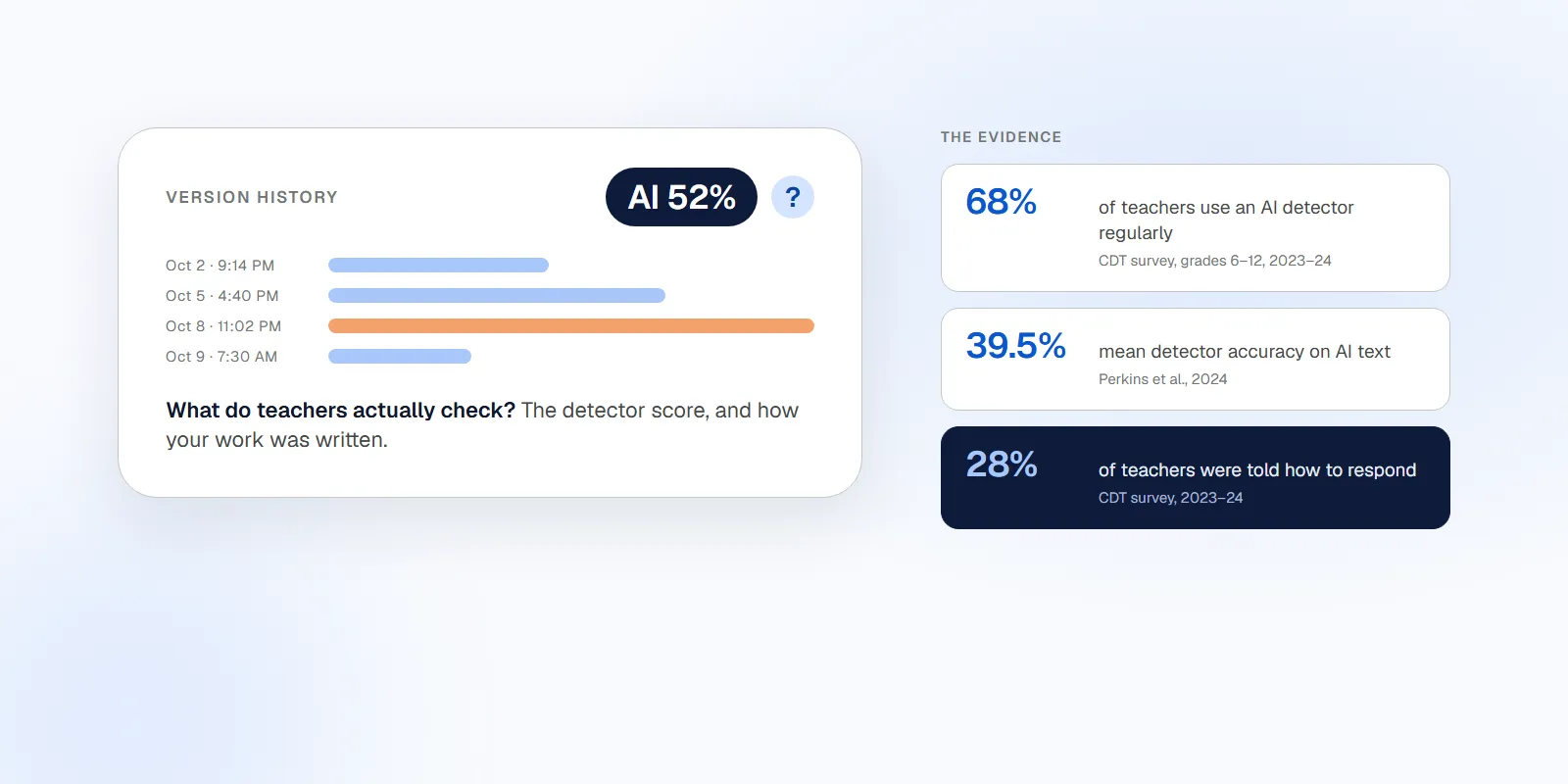
- 68% of US middle and high school teachers said they regularly used an AI content detection tool in 2023–24[1]. Turnitin and GPTZero are the names that come up most often in district contracts[2].
- Many teachers now check the writing process, not just the text: Google Docs version history, Revision History, Brisk’s Inspect Writing and Turnitin Clarity show time spent, edits and pasted text[5][6][7].
- Detectors are far from reliable. In one study, six detectors averaged 39.5% accuracy on AI text and got only 67% of human texts right[11]. OpenAI shut down its own detector for “low rate of accuracy”[10].
- Teachers aren’t reliable detectors either: 289 teachers in two experiments couldn’t consistently tell ChatGPT essays from student essays, and they were overconfident[13].
- Only 28% of teachers said they’d received guidance on how to respond to suspected AI use[1]. If you’re flagged, your drafts and version history are your strongest evidence.
What AI Detector Do Teachers Use Most?
The AI detector teachers use most is Turnitin, followed by GPTZero. Turnitin’s AI writing indicator sits inside the plagiarism checker that colleges and many school districts already pay for. GPTZero is the most common choice when a teacher or district buys a detector on its own.
So when students ask what teachers use to detect AI, the honest answer is a short list of tools plus the teacher’s own checks. NPR’s December 2025 reporting shows what that looks like in practice[2]. Broward County Public Schools in Florida is paying more than $550,000 for a three-year Turnitin contract. The Shaker Heights district near Cleveland pays GPTZero about $5,600 a year for 27 teachers’ licenses. In Prince George’s County, Maryland, the district doesn’t pay for any detector, and a teacher used one on their own.
| Tool | What it is | How teachers get it | What the teacher sees |
|---|---|---|---|
| Turnitin | AI writing indicator inside Turnitin’s similarity report | School or district license, usually through Canvas, Blackboard or Moodle | A percentage and highlighted passages |
| GPTZero | Standalone AI detector | Individual or district subscription, Chrome extension, Google Classroom and Canvas integrations[3] | A probability score; “Writing Replay” on premium plans |
| Pangram | Standalone AI detector | Free credits or subscription, LMS integrations for Canvas, Moodle and Google Classroom[4] | Sentence-by-sentence AI vs. human breakdown |
| Free web checkers (ZeroGPT, QuillBot and others) | Paste-in detectors | No contract, any teacher can use them | A single score, sometimes highlights |
| Process tools (Google Docs version history, Revision History, Brisk, Turnitin Clarity) | Show how the document was written | Built into Google Docs, or a Chrome extension or add-on | Typing time, edit sessions, pasted text, replay |
Vendor reach claims are big. GPTZero says it’s used by “2M+ educators”[3], and Pangram advertises “99.98% accuracy” without a published method on its teacher page[4]. Treat those as marketing, not measurements. For numbers with a published method, see our best AI detector comparison: ten tools, GPTZero and Pangram included, run on the same texts.
How many teachers use AI detectors?
A majority of teachers have used one. The Center for Democracy & Technology (CDT), a nonprofit, surveyed a nationally representative sample of 6th- to 12th-grade public school teachers for the 2023–24 school year. 68% said they used an AI content detection tool regularly[1], and 76% of licensed special education teachers did.
CDT’s later poll for the 2024–25 school year, as reported by NPR, found that more than 40% of 6th- to 12th-grade teachers used AI detection tools during that year[2]. The two surveys asked different questions, so they don’t show a clean trend. What they do show is that a detector check is a normal part of many classrooms.
What do professors use to detect AI?
Professors use mostly the same tools to detect AI, with one difference: in college, the choice is usually made by the institution, not the instructor. That’s why Turnitin dominates in higher education. It plugs into the learning management system your courses already run on. Some colleges have also switched the AI indicator off entirely.
Our guide to what AI detectors colleges use lists the main tools and the universities that turned detection off, with links to each announcement. If your course runs on Canvas, see where the AI score appears in Canvas and who can see it.
How Do Teachers Check for AI Without a Detector?
Teachers check for AI without a detector by looking at the writing process, comparing the work with what they know about the student, checking the sources, and talking to the student. Many teachers use these checks after a detector raises a flag; some use them instead of a detector.
Version history and writing replay
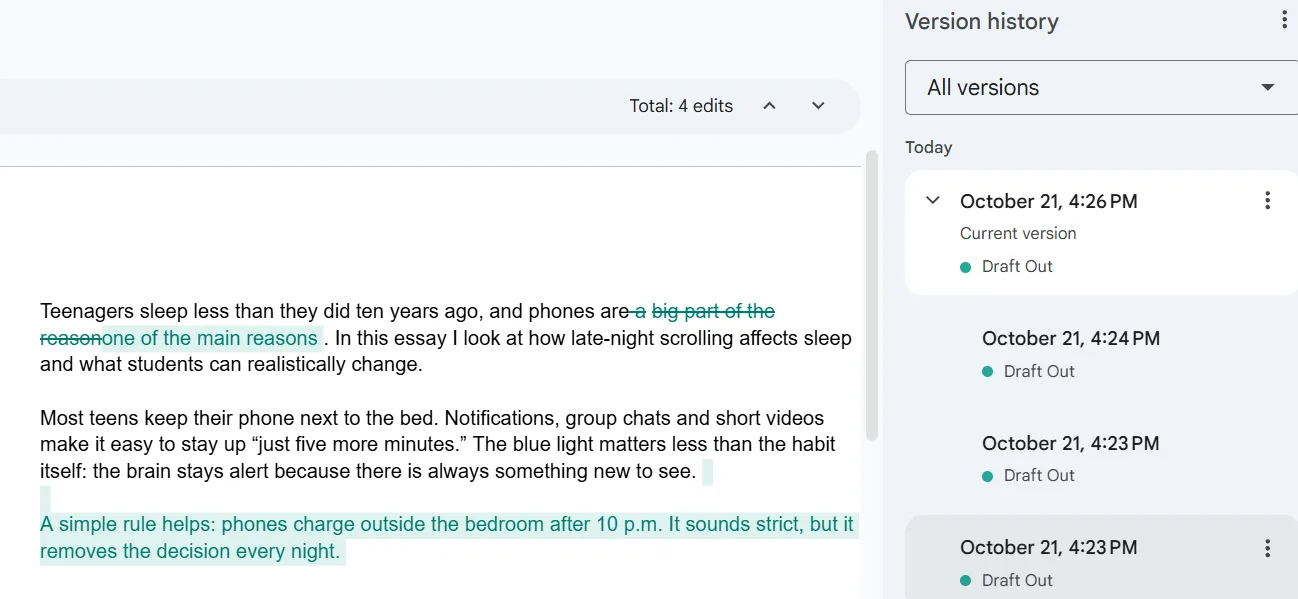
Ask how teachers can detect AI without software, and the most common answer is the document’s history. If you wrote in Google Docs and shared it with edit access, your teacher can open File → Version history and see earlier versions and who changed what[8]. You need edit permission to see a file’s version history, which is why many teachers ask students to share the doc, not just a PDF.
Extensions turn that history into a replay:
- Revision History shows total editing time, the number of editing sessions across days, typed versus pasted text, and a video replay of the document being created[6]. Its free plan covers up to 150 documents a month.
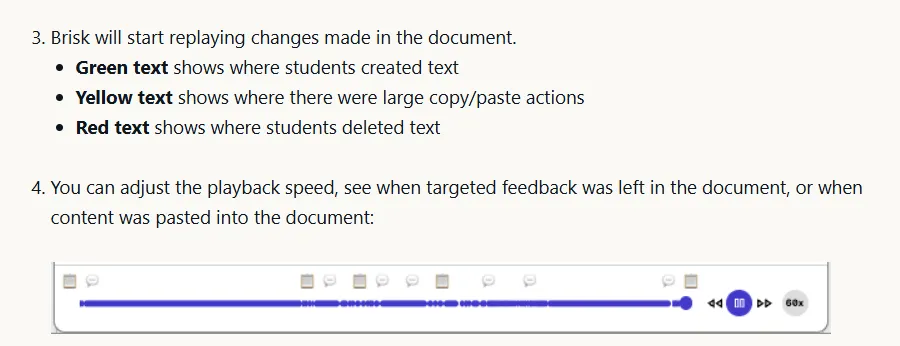
- Brisk’s Inspect Writing replays changes in Google Docs and OneDrive Word documents. Green marks created text, yellow marks large copy-paste actions, and red marks deletions[7].
- GPTZero’s Writing Replay lets teachers “watch documents being written” and see copy-pastes[3].
- Turnitin Clarity, available since July 2025, gives students a writing space inside Turnitin, and teachers see revision timelines, pasted versus typed text, and a summary of any AI chat history[5].
This is how one teacher in NPR’s report works. He runs every essay through GPTZero, and if the score is above 50%, he checks the revision history. A paper written in a single short session with very few edits gets a conversation[2].
Edutopia’s advice to English teachers points the same way: have students do their drafting in a shared document so the teacher can follow its progress[9].
Comparing the work with your earlier writing
Teachers who know your writing notice when it changes overnight. A sudden jump in vocabulary, a voice that doesn’t sound like your class discussions, or a polished essay from someone whose in-class writing looks very different will catch their attention. That’s why some teachers collect a short handwritten or in-class sample early in the term.
Checking your sources
AI tools still invent sources or attach real ones to claims they don’t support. A teacher who clicks two or three citations and finds a missing article, a wrong page number or a quote that doesn’t exist has much stronger evidence than any percentage. For the other style signs teachers look for, see how to detect AI-written text.
Reading for generic writing
Some patterns make teachers look twice: every paragraph the same length, general claims with no specific example, stock phrases, and a confident tone with nothing personal in it. None of these proves anything on its own. Plenty of careful human writers produce smooth, formal prose, especially non-native English speakers who were taught to write that way.
Asking you to explain your work
The simplest check is a conversation. “Walk me through how you got to this argument” or “Where did you find this source?” is easy to answer if you wrote the paper. The NPR teacher said that when he asked about a flag, students who had used AI admitted it about 75% of the time[2].
How Accurate Are the Tools Teachers Use?
The tools teachers use are not accurate enough to prove anything on their own. Research on the main detectors, including several that teachers use, finds frequent mistakes in both directions, and the vendors themselves say the score shouldn’t decide an outcome.
- OpenAI’s own detector caught only 26% of AI-written text in its evaluation and wrongly labeled human text as AI 9% of the time. OpenAI withdrew it on July 20, 2023, “due to its low rate of accuracy”[10].
- A 2024 study by Perkins and colleagues tested detectors including Turnitin, GPTZero, ZeroGPT and Copyleaks on 805 texts. Mean accuracy was 39.5% on unedited AI text and fell to 17.4% after simple edits. Only 67% of the human-written control texts were rated correctly[11]. The authors concluded the tools “cannot currently be recommended for determining academic integrity violations.”
- Penn researchers found false positive rates of roughly 5–6% in commercial detectors. One of them noted that at 5%, he’d wrongly accuse 35 of the 700 students in one of his classes[12].
- Non-native English writers are at higher risk. A Stanford-led study found that seven detectors flagged 61% of TOEFL essays by non-native speakers as AI on average[14].
- Turnitin reports a low false positive rate for its own tool, and its guide still says the score “should not be used as the sole basis for adverse actions against a student”[15]. Our article on whether Turnitin’s AI detector is accurate compares Turnitin’s numbers with independent tests.
Our test: the same text, different verdicts
We saw the same problem in our own test. In October 2026 we ran one AI-written text and one human text through the free tiers of several detectors. The AI text was 1,004 words with 19 APA references, and GPTZero rated it 100% AI. The human text was a chapter of Pride and Prejudice, published in 1813.
ZeroGPT, one of the free checkers anyone can use, rated the AI text as “likely human” and the 213-year-old novel as “likely AI.” Two other detectors changed their verdict sharply depending on how much of the same text they saw. If a teacher pastes your essay into one free checker, the number they get depends heavily on which checker they picked.
Are teachers better than detectors?
Not reliably. In two experiments published in 2024, 89 trainee teachers and 200 experienced teachers tried to pick out ChatGPT essays from student essays. Neither group could do it reliably, and both were overconfident in their judgments[13]. Experienced teachers did somewhat better than novices. The Penn researchers add that people in several studies performed barely better than chance[12].
That’s why the strongest checks are the ones that don’t rely on anyone’s gut: the version history, the sources, and a conversation about the work.
Can Your Teacher Tell If You Used ChatGPT?
Your teacher can sometimes tell if you used ChatGPT, but not by reading alone and not reliably by detector alone. They’re most likely to notice when the text was pasted in one block, when a source doesn’t exist, or when you can’t explain an argument you supposedly wrote.
A detector score raises the question, and the process evidence usually answers it. A paper with three weeks of version history, an outline and messy early drafts looks very different from one that appeared in a single paste ten minutes before the deadline. Whatever AI use your class allows, the syllabus and the assignment instructions are the rule that counts.
What Happens If a Teacher’s AI Detector Flags Your Work?
If a teacher’s AI detector flags your work, it usually leads to a conversation, though sometimes it goes straight to a lower grade. Few teachers have a clear process: only 28% in the CDT survey said they’d been told how to respond to suspected AI use, and 64% said students at their school had gotten in trouble for using or being accused of using AI[1].
NPR reported one documented case[2]. Ailsa Ostovitz, a 17-year-old junior in Maryland, was accused of using AI on three assignments in two classes. One teacher’s screenshot showed a 30.76% AI probability on an assignment about the music she listens to. Her grade was docked before anyone talked to her. After her mother met with the teacher, the teacher no longer believed she’d used AI. Her district said it advises teachers not to rely on such tools.
If it happens to you:
- Ask what was flagged. Which passages, which tool, and which course policy applies?
- Share your process. Version history, outline, notes and source list show how the paper developed.
- Offer to explain it. Talking through your argument and sources is the fastest way to settle the question.
- Don’t rewrite the final in a panic. Your existing drafts are your record. A last-minute rewrite muddies it.
- Ask about the review process. Most schools have one, and many say a score alone isn’t enough.
How to Check Your Work Before Your Teacher Does
You can’t run your teacher’s tool, but you can make your process visible and see how your draft reads to detectors before you submit.
- Write in Google Docs or Word online from the first outline, so your version history exists if anyone asks.
- Keep your notes and sources in the same folder as the draft.
- Click every citation. Make sure each source exists and says what you say it says.
- Check for unintentional copying. A plagiarism detector shows passages that match existing sources, so you can quote or cite them properly.
- Run the draft through more than one detector. No detector is 100% accurate, and as our test showed, they disagree. If several flag the same paragraph, reread it. Is it vague, overly smooth or generic? Revise it in your own voice (here’s how to make AI text sound human), then check again.
Check before you submit. Paste your essay into Draftout’s AI Detector. It scores your text with several detectors, including Originality.ai, GPTZero, Copyleaks and Scribbr, and highlights the sentences driving the score. The AI Detector check is free.



If you want the full toolkit, Draftout’s plans start with a 2-day trial for $2, then $39.99/month.
A Note for Teachers: Using AI Detectors Fairly
If you’re a teacher reading this, the research and the vendors agree on one point: use a detector score to start a conversation, not to reach a conclusion. GPTZero calls its tool “a conversation starter”[3], Pangram calls detection “a decision-support tool, not a disciplinary weapon”[4], and Turnitin says its score shouldn’t be the sole basis for action[15].
What helps in practice, based on Edutopia’s and MIT Sloan’s guidance[9][16]:
- State your policy. Say in the syllabus which AI use is allowed, and disclose whether you use a detector.
- Ask for the process. Drafts in a shared document, outlines and short reflections give you evidence that a score can’t.
- Design for authenticity. Personal topics, in-class components and staged deadlines make AI shortcuts less useful.
- Use more than one signal. A score, the version history and a conversation together are far more reliable than any one of them.
Frequently Asked Questions
What AI detector do most teachers use?
Most teachers use Turnitin, because its AI indicator is built into the plagiarism checker many schools and colleges already license. GPTZero is the most common standalone detector, and some teachers use free checkers like ZeroGPT. Many also check Google Docs version history instead of, or alongside, a detector.
How do teachers check for AI on Google Docs?
Teachers with edit access open File, then Version history, to see earlier versions and who changed what. Extensions like Revision History and Brisk replay the document and show typing time, editing sessions and large pastes. A long essay that appears in one paste stands out.
Can teachers detect AI if you paraphrase it?
Sometimes. Paraphrasing tools lower many detectors’ scores, and research shows accuracy drops sharply after simple edits. But paraphrasing doesn’t create version history, fix invented sources or help you explain the argument, which is how teachers usually confirm their suspicions.
Is 20% AI detection bad?
Not by itself. There’s no universal threshold, and Turnitin doesn’t show scores under 20% as a number because they’re less reliable. What happens next depends on your teacher, your school’s policy and whether your process backs up your work.
Do professors check every paper for AI?
It depends on the course. At colleges that keep Turnitin’s AI indicator on, every paper submitted through it may get a score automatically, but the instructor decides whether to look at it. Some colleges have switched the feature off.
Can my teacher tell if I used ChatGPT just by reading?
Not reliably. Studies show teachers, even experienced ones, struggle to tell ChatGPT essays from student essays and tend to be overconfident. Teachers are much better at spotting a change from your usual writing, missing sources or work you can’t explain.
What AI Detector Do Teachers Use, and What Should You Do?
Most teachers use Turnitin or GPTZero, and more and more of them also look at how your work was written: version history, pasted text and your ability to explain it. None of these checks is perfect. Detectors make mistakes in both directions, and teachers’ instincts aren’t much better.
The best protection is a visible process. Write in a document that keeps its history, keep your notes and sources, check every citation, and see how your draft reads before you submit. An ai detector that scores your text with several detectors gives you a second opinion before the one that counts.
How We Checked This
- What we read. Every source below was opened and read on October 21, 2026, except Turnitin’s AI Writing Report guide, which we read on October 20, 2026 for our Turnitin accuracy article. The CDT press release, NPR report, OpenAI post, Springer study, Turnitin press release and Brisk help page were read in a browser because they block automated tools.
- How we used the numbers. Each figure was checked against the page it comes from. CDT’s 2025 poll PDF wouldn’t open for us, so its “more than 40%” figure is cited as NPR reported it. Vendor figures (GPTZero’s educator count, Pangram’s accuracy claim) are labeled as vendor claims.
- Our own test. October 6–12, 2026: one AI-written text (1,004 words, 19 APA references) and one human text (a chapter of Pride and Prejudice), run once through each service’s free tier. GPTZero was our reference detector. This is one text of each kind, so it shows disagreement between detectors, not their accuracy.
- What we did not do. We didn’t test Turnitin, Pangram, Revision History, Brisk or Turnitin Clarity ourselves, and we have no access to any school’s detector results. Draftout’s own detector was not part of the October test.
- Changelog. October 21, 2026: first version.
Sources
- [1]Center for Democracy & Technology, “New Research: Educators Still Struggling with Generative AI Detection, Discipline, and Distrust, Despite Increased School Guidance” (Mar 27, 2024)68% of teachers use an AI content detection tool regularly (2023–24), 76% of licensed special education teachers, 64% say students got in trouble, 28% got guidance on how to respond · accessed Oct 21, 2026
- [2]Lee V. Gaines, “Teachers are using software to see if students used AI. What happens when it’s wrong?” (NPR, Dec 16, 2025)CDT 2025 poll (more than 40% of 6–12 teachers), Broward’s Turnitin contract, Shaker Heights’ GPTZero licenses, a teacher’s 50% + revision-history workflow, the Ostovitz case · accessed Oct 21, 2026
- [3]GPTZero, “AI Detector for Teachers” (educators page)“2M+ educators”, Writing Replay, Google Classroom and Canvas integrations, “conversation starter”. Vendor page, sells an AI detector · accessed Oct 21, 2026
- [4]Pangram, “AI Detector for Teachers”LMS integrations, “99.98% accuracy” (no method on the page), “a decision-support tool, not a disciplinary weapon”. Vendor page, sells an AI detector · accessed Oct 21, 2026
- [5]Turnitin, “Turnitin Delivers Turnitin Clarity…” (press release, Jul 15, 2025)General availability, revision timelines, pasted vs. typed text, summary of AI chat history. Vendor press release · accessed Oct 21, 2026
- [6]Revision History (Chrome extension for Google Docs)Editing time, sessions, typed vs. pasted text, replay; free plan up to 150 documents a month. Vendor page · accessed Oct 21, 2026
- [7]Brisk Teaching, “How To: Inspect Writing” (help center)Replay of Google Docs and OneDrive Word documents; green, yellow and red marks. Vendor documentation · accessed Oct 21, 2026
- [8]Google, “Find what’s changed in a file” (Google Docs Editors Help)Version history, who made changes, edit permission required · accessed Oct 21, 2026
- [9]Jen Roberts, “What ELA Teachers Should Know About AI Detectors” (Edutopia, Dec 11, 2024)Detection “at best a probability and never a certainty”, drafting in shared documents, disclosing detector use · accessed Oct 21, 2026
- [10]OpenAI, “New AI classifier for indicating AI-written text” (Jan 31, 2023; note added Jul 20, 2023)26% of AI text identified, 9% false positives, withdrawn for “low rate of accuracy” · accessed Oct 21, 2026
- [11]M. Perkins, J. Roe, B. H. Vu et al., “Simple techniques to bypass GenAI text detectors: implications for inclusive education” (International Journal of Educational Technology in Higher Education, 2024)805 texts, mean accuracy 39.5% falling to 17.4%, 67% of human samples correct, not recommended for integrity decisions · accessed Oct 21, 2026
- [12]Liz Tung, “Can teachers spot AI writing? Penn researchers weigh in” (WHYY, updated Dec 1, 2025)False positive rates of about 5–6%, 35 of 700 students, humans barely better than chance · accessed Oct 21, 2026
- [13]J. Fleckenstein, J. Meyer, T. Jansen et al., “Do teachers spot AI? Evaluating the detectability of AI-generated texts among student essays” (Computers and Education: Artificial Intelligence, vol. 6, 2024)89 novice and 200 experienced teachers, AI texts not reliably detected, overconfidence · accessed Oct 21, 2026
- [14]W. Liang, M. Yuksekgonul, Y. Mao, E. Wu, J. Zou, “GPT detectors are biased against non-native English writers” (arXiv 2304.02819, 2023; published in Patterns)Seven detectors flagged 61% of TOEFL essays on average · accessed Oct 20, 2026
- [15]Turnitin, “Using the AI Writing Report” (Turnitin Guides)Score “should not be used as the sole basis for adverse actions”, scores under 20% not shown as a number. Vendor documentation · accessed Oct 20, 2026
- [16]MIT Sloan Teaching & Learning Technologies, “AI Detectors Don’t Work. Here’s What to Do Instead.”Clear AI policies, transparency, assignment design, mixed assessment · accessed Oct 21, 2026

Table of contents
