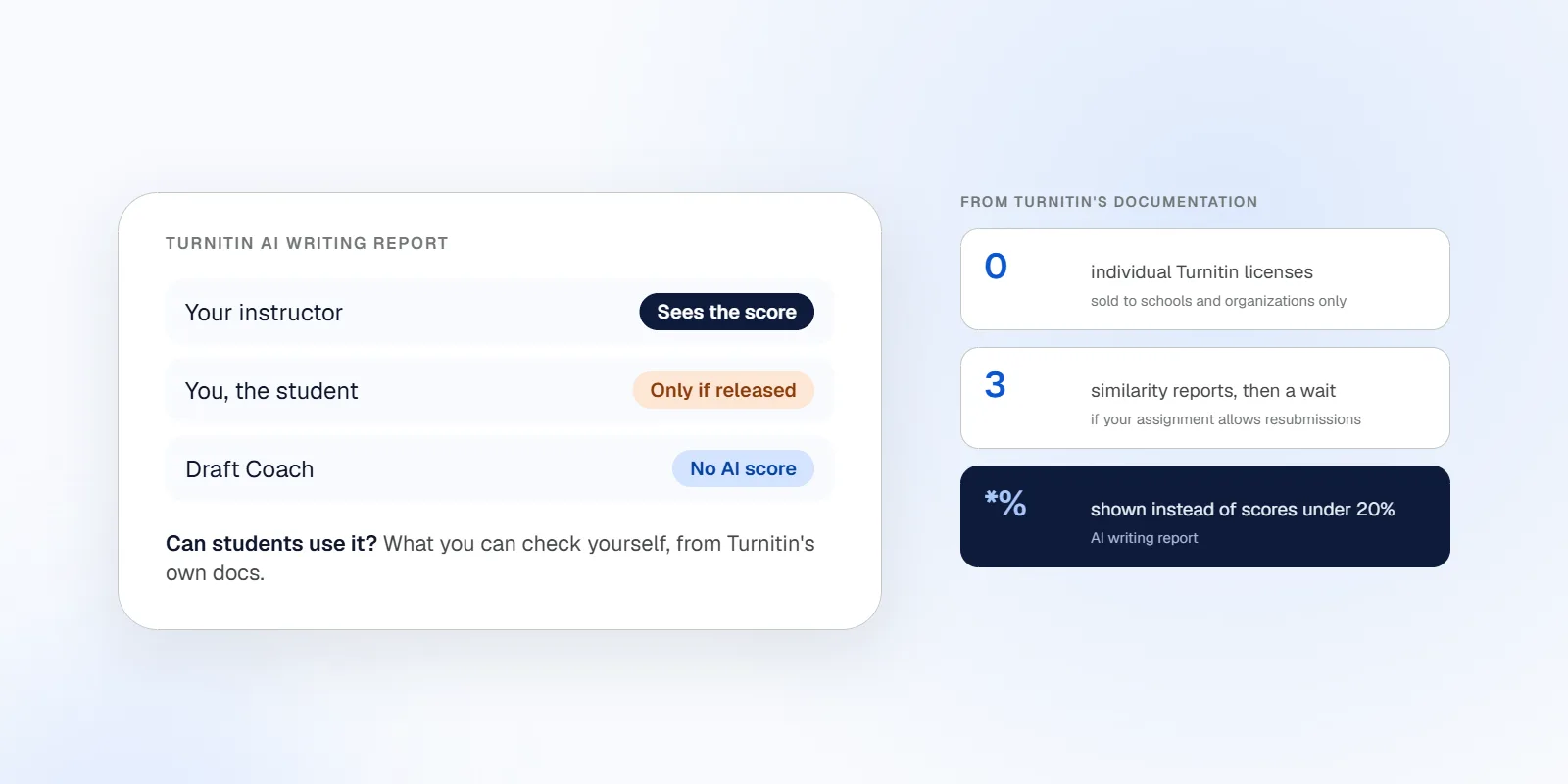
Students can’t buy or run Turnitin’s AI detector on their own. Turnitin sells to schools and other organizations, and even then your instructor decides whether you ever see the AI report[1][2]. What you can do is check a draft before you submit: through Draft Coach if your school turned it on, by resubmitting to your assignment if it allows that, or with a separate tool that gives you a second opinion.
Say you’ve just finished a paper and you’re about to upload it. Whatever Turnitin shows your instructor, you’ll learn it after the fact, if at all. That gap is why so many students search for a way to run the Turnitin AI detector themselves.
This page explains what Turnitin’s AI detector shows and to whom, what you can actually use as a student, what some US schools publish about it, and where Draftout fits as a different kind of check. Every Turnitin fact comes from Turnitin’s own pages or from the schools named, with a source for each.
Disclosure: Draftout makes an AI detector, so we have a stake in this topic. We haven’t tested Turnitin and have no access to it. Our own test of Draftout’s detector is described below as pending, with no numbers yet. How we checked this.
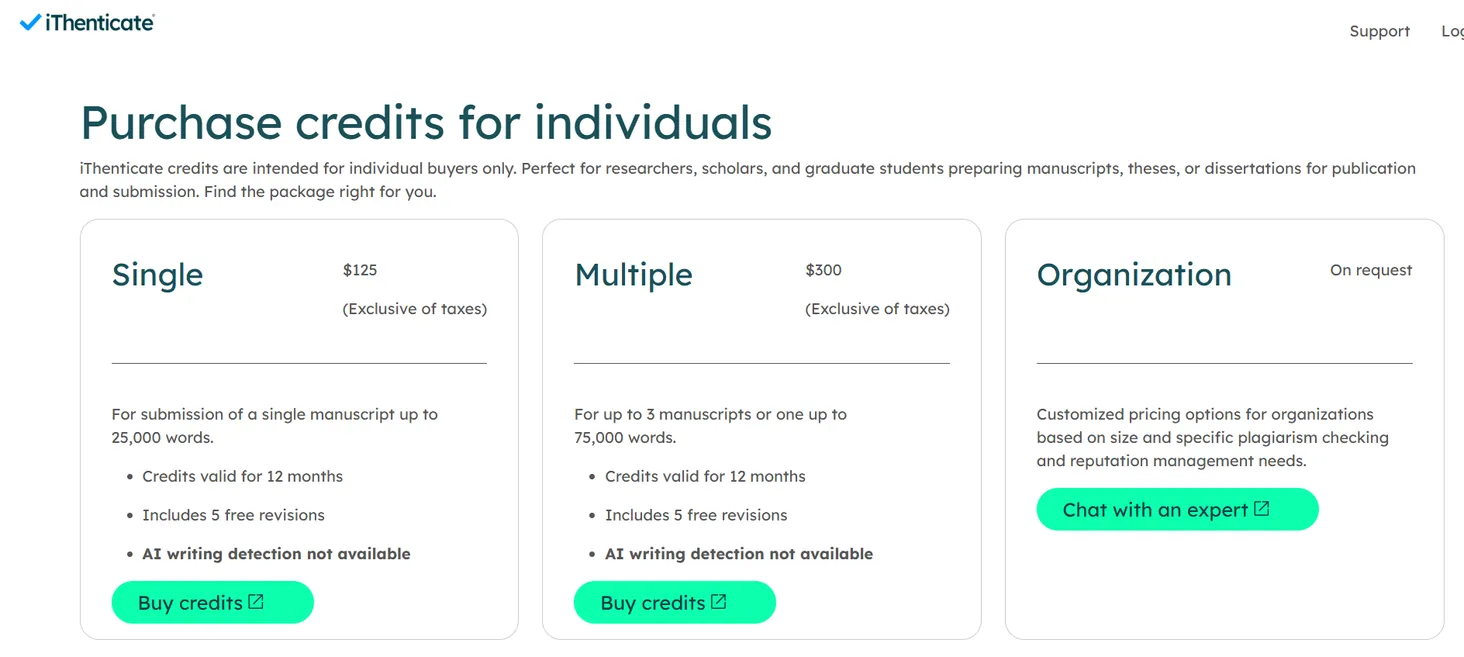
- Turnitin sells its AI detector to schools and organizations only. It has no individual license, and its individual iThenticate packs list “AI writing detection not available.”
- Draft Coach, the self-check tool a school can switch on, reports similarity, citations and grammar. It doesn’t show an AI score.
- Your instructor decides whether you see the AI report. Some schools have turned the detector off: Washington State cancelled it in February 2026, and Yale and Michigan State list it as disabled or unavailable.
- Without Draft Coach, the only way to get a similarity report before your final submission is an assignment that allows resubmissions: three reports, then a wait.
- Draftout does a different job: you run it before you submit, it sees only the text you paste, and it can’t predict your school’s Turnitin result.
Can Students Use Turnitin’s AI Detector?
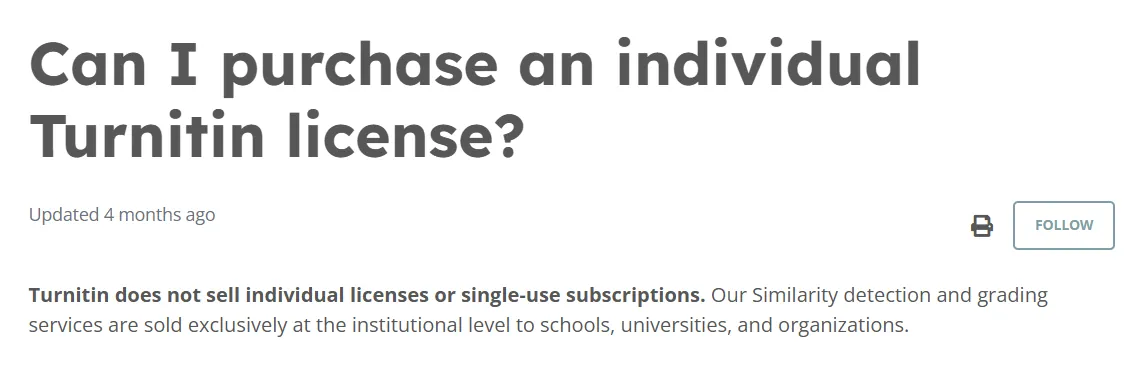
Students can’t use Turnitin’s AI detector on their own, because Turnitin sells only at the institutional level. Turnitin says it doesn’t sell individual licenses or single-use subscriptions, and that its similarity and grading services go to schools, universities and organizations[1].
The one product for individuals is iThenticate, aimed at researchers and graduate students preparing manuscripts or theses. It sells credit packs: $125 for one manuscript up to 25,000 words, or $300 for up to three manuscripts or one up to 75,000 words. Both packs are listed as “AI writing detection not available”[3].
So when a student has Turnitin, it comes through the school. What you can reach depends on how your school set it up:
| What | Can you use it yourself? | Source |
|---|---|---|
| Individual Turnitin license | No | [1] |
| Similarity report before final submission | Only through an assignment that allows resubmissions, or Draft Coach if your school enables it | [4] |
| AI Writing Report | Only if your instructor makes it available to students | [2] |
| Draft Coach (similarity, citations, grammar) | If your school licenses and configures it | [5][6] |
| Clarity writing space and Writing Report | If your school uses Clarity and your instructor releases the report | [7] |
As of October 23, 2026, from Turnitin’s documentation. Your school’s settings may differ.
Want a second opinion before you submit? Run your draft through our ai detection tool. The check is free and scores your text with several detectors. It can’t show what your school’s Turnitin will say; more on that below.
How Do You Check Your Paper With Turnitin Before You Submit?
You can check a paper with Turnitin before you submit in three ways, and none of them is guaranteed to show an AI score. Which ones exist for you depends on your school and your instructor.
Turnitin Draft Coach, if your school turned it on
Draft Coach is an add-on that works inside Google Docs or Microsoft Word online. Your school’s Turnitin administrator has to set it up, it depends on the school’s license, and it doesn’t work in desktop Word[5]. Students can’t send the results to their instructor, and drafts checked in Draft Coach aren’t stored in Turnitin’s repository[5].
The student reports have three parts: Similarity Check, Citation Check and Grammar Guide[6]. None is an AI score. The University of Missouri System says so directly: its Draft Coach notice states that the tool “does not detect possible use of AI in writing”[11].
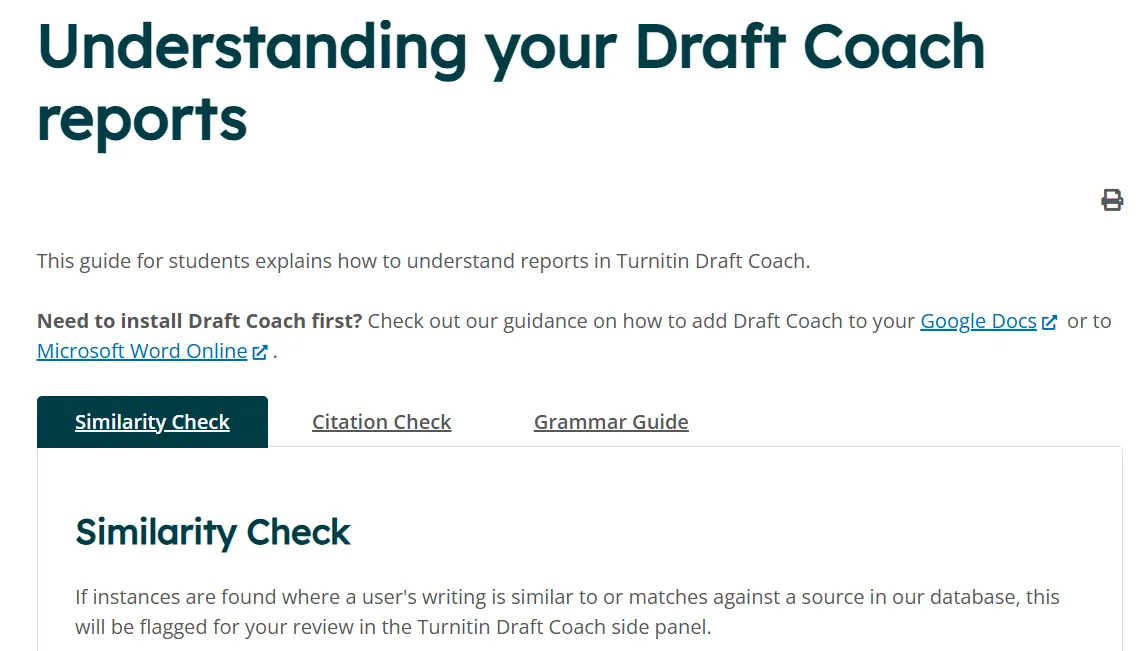
Schools set their own limits. NC State asks students to request access first, and the feedback in Google Docs is visible only to the student[8]. Chapman allows up to three similarity checks per document, in Word or Google Docs[9]. Penn State offers it in Word Online only[10].
Resubmitting to your assignment, if resubmissions are on
Without Draft Coach, Turnitin says you can only see a similarity score by submitting your draft to an assignment that allows resubmissions, and any new upload overwrites your previous draft[4]. In classic assignments, the first three attempts generate a report immediately and later ones wait 24 hours. In standard assignments you can resubmit up to three times in 24 hours[4].
If your instructor turned resubmissions off, your first attempt is final. And an AI report shows up here only if your instructor made it available to students[2].
Asking for a practice assignment
If your instructor disabled resubmissions, Turnitin suggests asking whether they’d set up a separate practice assignment for drafts[4]. It costs one email, and it’s the only route that gives you a Turnitin report on your real paper before the real deadline.
Turnitin Clarity is something else
Clarity is a writing space your instructor assigns, not a checker you run on a finished paper. If your instructor releases it, you can open a Writing Report that shows how you wrote the assignment, including your AI chat activity; the Similarity Report appears only if the instructor enabled it[7]. The Writing Report in Clarity isn’t the AI Writing Report that scores a submission.
What Does Turnitin’s AI Detector Show Your Instructor?
Turnitin’s AI detector shows your instructor a percentage of “qualifying text” that it estimates was written by AI, plus highlighted passages. Qualifying text means prose sentences in long-form writing, and the file needs at least 300 and at most 30,000 words[2].
A few details that change how you read a score:
- Low scores are hidden. Below 20%, the report shows an asterisk (
*%) instead of a number[12]. - Rewritten AI text is covered too. Since August 27, 2025, Turnitin says its detector also looks for text that was likely modified with tools made to make AI writing read as human. Only the English detector has this capability[12][2].
- Seven languages are supported: English, Spanish, Japanese, Arabic, German, Dutch and Turkish[2].
- Old reports aren’t recalculated. When Turnitin updates a model, previous reports stay as they were; a resubmission gets the new score[12].
Turnitin itself says the model may not always be accurate and shouldn’t be the sole basis for action against a student[2]. For a closer look at the numbers, see our article on how accurate Turnitin’s AI detector is.
One recent school test shows why caution matters. In December 2025, a University of New Mexico working group tested the detector on 84 texts of known human origin and 63 AI-generated or AI-assisted texts. It flagged 3 of the human texts and missed 42 of the AI ones[13]. That’s one campus’s small test, not a benchmark of Turnitin.
What Do US Schools Say Students Can See?
US schools don’t follow one policy: some turned Turnitin’s AI detector off, some turned it on, and many say nothing public about what students can see. The table lists schools whose official pages we opened on October 23, 2026.
| School | Turnitin AI detection | What students can use | Page date |
|---|---|---|---|
| Washington State University | Contract cancelled as of February 2026; plagiarism package stays in Canvas[14] | Similarity package via Canvas | Feb 11, 2026 |
| Yale University | “Currently disabled”[15] | Not stated on the page | Undated |
| Michigan State University | “Not currently available”[16] | Not stated on the page | Undated |
| NC State University | Re-enabled, with a warning that results can include false positives[8] | Draft Coach in Google Docs after an access request | Sep 2, 2025 |
| Chapman University | Not stated on the page | Draft Coach in Word or Google Docs, up to 3 similarity checks per document[9] | Dec 1, 2025 |
| Penn State | Not stated on the page | Draft Coach in Word Online only[10] | Apr 18, 2025 |
| University of Missouri System | Not stated on the page | Draft Coach in Office 365 since Jan 6, 2025; it does not detect possible use of AI[11] | Jan 2025 notice |
Our selection and paraphrase of each school’s public page, checked October 23, 2026. “Not stated” means the page doesn’t say, not that the school doesn’t use the tool. Policies change every term. Not legal advice.
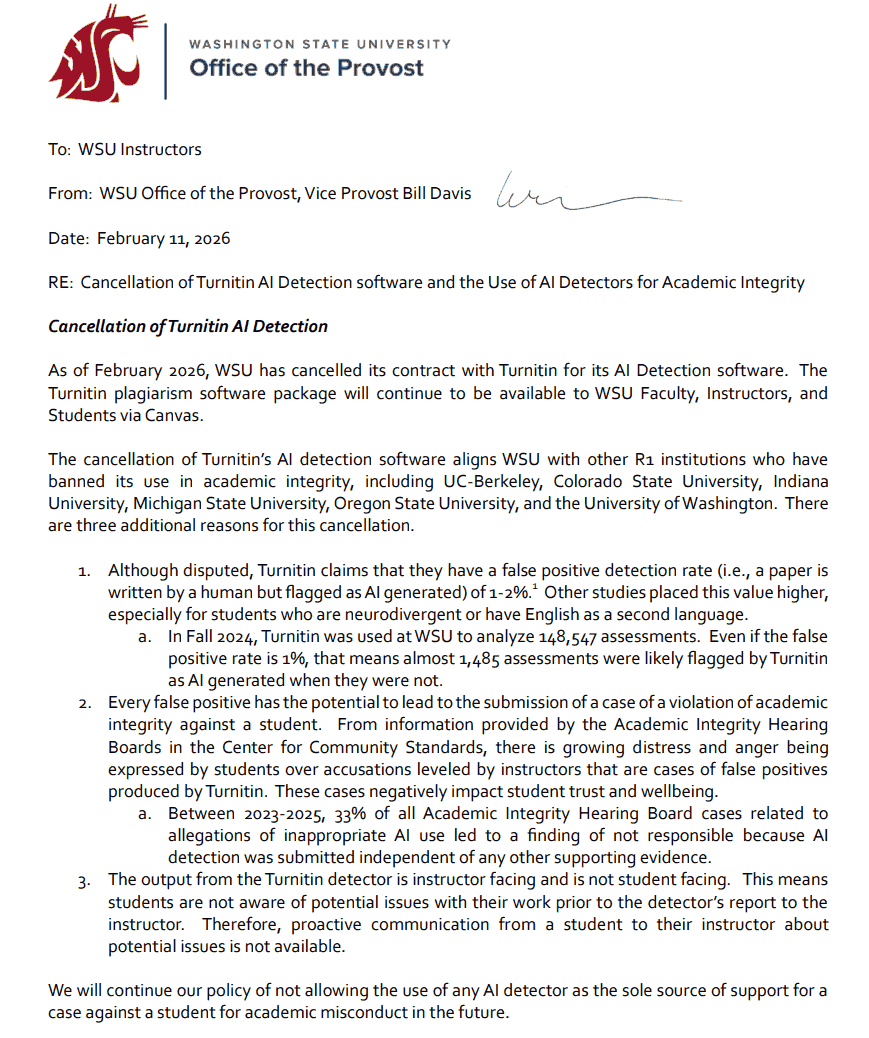
The most useful entry is Washington State. Its provost’s office gave three reasons for cancelling. The one that matters to you: the Turnitin result goes to the instructor and not to the student, so a student can’t raise a problem with the instructor before the report arrives[14]. The memo also says that, between 2023 and 2025, a third of the university’s hearing-board cases about alleged AI misuse ended in a finding of “not responsible,” because the detector result was the only evidence[14].
Even at schools that keep the detector on, the report is usually an instructor’s tool. For more schools that turned it off, see what AI detector colleges use. For what instructors do besides running a detector, see how teachers detect AI.
Are “Turnitin AI Checker” Websites the Real Thing?
A website that offers individuals a “Turnitin AI checker” can’t be the Turnitin your school uses, because Turnitin says it doesn’t sell individual access[1]. At best it’s a different tool using the name.
Before you paste a paper into one, check who runs it, what it says about its method, and what it does with your text. And remember a limit that applies to every checker, ours included: none of them can see your school’s Turnitin settings, its repository or the papers other students submitted.
Which AI Detector Is Closest to Turnitin?
No other AI detector reproduces Turnitin’s score, because Turnitin’s model is closed and different detectors measure differently. Two detectors can give the same paper very different percentages.
A second detector is useful as a second opinion, not as a forecast. If several detectors read your draft as clearly human, that’s reassuring. If one says 40% and another says 5%, the honest takeaway is that detectors disagree, and your own record of how you wrote the paper matters more. Our article on whether Canvas has AI detection covers the other signals a school may have.
Turnitin vs Draftout: Different Jobs
Turnitin is a tool your school buys to review submitted work, and Draftout is a tool you use on your own draft before you submit. They answer different questions, so this isn’t a head-to-head.
| Turnitin | Draftout | |
|---|---|---|
| Who buys it | Schools and organizations[1] | Students, individually |
| Who sees the AI report | The instructor; the student only if it’s released[2] | You |
| When it’s used | After you submit (Draft Coach and resubmission give a similarity view before) | Before you submit |
| What it compares against | Its own model; similarity runs against its repositories, including the school’s private one[5] | Only the text you paste |
| Length | 300 to 30,000 words[2] | Up to 15,000 words in the check |
| Price | Sold per school; no individual license[1] | AI Detector check is free; 2-day trial for $2, then $39.99/month for the full toolkit |
Turnitin: its own documentation, accessed October 23, 2026. Draftout: our own product information. Not a test result.
What Turnitin does that we can’t. It’s the tool your instructor actually uses, so it’s the only one whose result your instructor sees. It also compares papers against its own repository, including your school’s past submissions. We can’t see any of that, and neither can any other outside tool.
What Draftout is for. Draftout scores your draft with several detectors and highlights the sentences that read as AI-likely, before anyone else sees it. You can then revise in your own voice and check again. It can’t predict your Turnitin score or tell you what your school’s settings are. If you also want a similarity view, Draftout has a plagiarism check tool, and it has the same limit: it can’t see your school’s repository.
How We’ll Test Draftout’s Detector
We haven’t run this test yet, and until the results are here, this page contains no quality verdict about Draftout’s detector. Here’s the protocol we’ll publish with the results.
Test texts.
- One AI-written essay of about 1,000 words with 19 APA references.
- The first 293 words of the same essay, because short texts often score differently from full ones.
- A chapter of Pride and Prejudice (1813), which a human wrote long before AI writing tools existed.
Scorecard.
| Check | Pass if |
|---|---|
| Human text | The 1813 chapter isn’t labeled likely AI |
| AI text | The full essay is labeled likely AI |
| Short fragment | We report how the score changes between the fragment and the full essay |
Steps. Same day, default settings, a private browser window, first attempt only. We save a screenshot of each result and publish all of them, including any run that goes against us. We repeat nothing and pick no “best” result.
Status: pending. We haven’t tested Turnitin itself: we have no institutional access.
A Pre-Submission Checklist (Works With Any Tool)
Whichever tool you use, these steps protect you more than any single score does:
- Read your syllabus AI policy. Rules differ by course, not only by school.
- Ask your instructor whether Draft Coach is available, whether resubmissions are on, and whether students will see the AI report.
- Keep your drafts and version history. Google Docs and Word both save them, and they show how the paper grew.
- Revise in your own voice, then check again with a detector of your choice.
- Treat every score as a signal, not a verdict. No detector is 100% accurate, and Turnitin says so too[2].
- If your paper is flagged anyway, ask what the report is based on, bring your drafts and sources, and ask for a conversation before any decision.
Before you upload a graded paper as a test: a resubmission overwrites your previous draft[4], and a site you don’t know may keep your text. Use your school’s practice route when you can.
Frequently Asked Questions
Can students use Turnitin’s AI detector?
Not on their own. Turnitin sells only to institutions, so students get access through their school, and the AI report is visible to students only if the instructor makes it available. Ask your instructor or your school’s IT help desk what your school has enabled.
Is there a free Turnitin AI checker for students?
No. Turnitin doesn’t sell individual licenses, and a site that claims to offer a free Turnitin check isn’t offering your school’s Turnitin. What does exist: Draft Coach if your school enabled it, resubmission to an assignment that allows it, and separate tools such as Draftout’s free AI Detector check, which gives a second opinion and isn’t Turnitin.
Does Turnitin Draft Coach show an AI score?
No. Draft Coach’s student reports cover similarity, citations and grammar. The University of Missouri System states plainly that it doesn’t detect possible use of AI in writing.
Can I see my own Turnitin AI score?
Only if your instructor makes the AI Writing Report available to students, and some schools have switched the AI detector off altogether. If you can’t see a score, asking your instructor whether they use it is a fair question.
Which AI detector is closest to Turnitin?
None reproduces Turnitin’s result. Its model is closed and detectors disagree with each other, so use a second detector as a second opinion rather than a prediction.
How accurate is Turnitin’s AI detection?
Turnitin says its model may not always be accurate and shouldn’t be the only basis for action against a student. Independent evidence is limited and mixed. Our article on Turnitin’s AI detector accuracy walks through the numbers.
Is Draftout the same as Turnitin?
No. Turnitin is bought by schools and reviews submitted work, while Draftout is a tool you use on your own draft before you submit. It can’t see your school’s repository or settings, and it doesn’t predict your Turnitin result. You stay the author either way.
Check Before You Submit, Then Ask Your School
The Turnitin AI detector isn’t something students can run themselves, and what you see of it depends on your school and your instructor. Use what your school offers (Draft Coach, a resubmission, or a practice assignment), keep your drafts, and get a second opinion before you hit submit.
Draftout is an AI writing toolkit for students, with an ai detector and humanizer among its tools. The AI Detector check is free. The full toolkit is a 2-day trial for $2, then $39.99/month; see pricing.
How We Checked This
- What we read. Every source below was opened and read on October 23, 2026. Turnitin’s guides were read in a browser because they block automated tools. Two schools we had considered, Regis University and Fresno State, aren’t in the table because their pages wouldn’t open for us.
- How we used the numbers. Every figure comes from the page it’s attributed to. Release dates come from Turnitin’s AI writing detection model page. The University of New Mexico figures are one campus’s own test and are labeled that way.
- What we did not do. We haven’t tested Turnitin and have no access to it. We haven’t run our own detector test yet; the protocol above shows how we will. “Not stated” in the school table means the page doesn’t say, not that the school doesn’t use the tool.
- Changelog. October 23, 2026: first version.
- Corrections. If a school’s policy has changed, tell us and we’ll update the table with the date.
Sources
- [1]Turnitin, “Can I purchase an individual Turnitin license?” (Turnitin Help Center)Turnitin sells at the institutional level only; no individual licenses. Vendor’s own page · accessed Oct 23, 2026
- [2]Turnitin, “Using the AI Writing Report” (Turnitin Guides)What students see if the report is made available, 300–30,000 words, supported languages, “may not always be accurate”, rewriting-tool detection in English only. Vendor documentation · accessed Oct 23, 2026
- [3]iThenticate, “Purchase credits for individuals” (Turnitin)Single $125 and Multiple $300 packs; “AI writing detection not available.” Vendor’s own page · accessed Oct 23, 2026
- [4]Turnitin, “Can students check a paper in Turnitin for Similarity before submitting it to an assignment?” (Turnitin Help Center)Draft Coach, resubmission limits, practice assignment. Vendor documentation · accessed Oct 23, 2026
- [5]Turnitin, “Turnitin Draft Coach™ FAQ” (Turnitin Guides)Google Docs / Word online add-on, administrator setup, license dependent, no desktop Word, repositories searched, drafts not stored. Vendor documentation · accessed Oct 23, 2026
- [6]Turnitin, “Understanding your Draft Coach reports” (Turnitin Guides, student hub)Similarity Check, Citation Check, Grammar Guide. Vendor documentation · accessed Oct 23, 2026
- [7]Turnitin, “Reviewing your Clarity submission and Writing Report” (Turnitin Guides, student hub)Clarity writing space; Writing Report and Similarity Report shown only if the instructor enables them. Vendor documentation · accessed Oct 23, 2026
- [8]NC State DELTA, “Turnitin updates: AI detection and more” (Sep 2, 2025)AI detection re-enabled; results can include false positives; Draft Coach access request, feedback visible to the student. University page · accessed Oct 23, 2026
- [9]Chapman University, “Draft Coach now available for Chapman users” (Dec 1, 2025)Word and Google Docs; up to three similarity checks per document; no mention of AI detection. University page · accessed Oct 23, 2026
- [10]Penn State IT, “Turnitin Draft Coach: check papers before submission” (Apr 18, 2025)Word Online only; self-check before submission; no mention of AI detection. University page · accessed Oct 23, 2026
- [11]University of Missouri System, Draft Coach availability notice (Knowledge Base)Available in Office 365 from Jan 6, 2025; “does not detect possible use of AI in writing.” University page, no modified date shown · accessed Oct 23, 2026
- [12]Turnitin, “AI writing detection model” (Turnitin Guides, release notes)*% below 20%, Aug 27, 2025 update, no retroactive recalculation, Oct 14, 2026 English update. Vendor documentation · accessed Oct 23, 2026
- [13]University of New Mexico, Center for Teaching Excellence, AI assessment guideDecember 2025 working-group test: 84 human texts (3 flagged), 63 AI-generated or AI-assisted texts (42 not identified). One campus’s small test, not a benchmark · accessed Oct 23, 2026
- [14]Washington State University, Office of the Provost, “Cancellation of Turnitin AI Detection software and the Use of AI Detectors for Academic Integrity” (memo to instructors, Feb 11, 2026, PDF)Contract cancelled; plagiarism package stays; result is instructor-facing; hearing-board outcomes 2023–2025. University memo · accessed Oct 23, 2026
- [15]Yale Poorvu Center for Teaching and Learning, Turnitin in CanvasAI detection “currently disabled.” University page, undated · accessed Oct 23, 2026
- [16]Michigan State University, D2L help, “Turnitin AI Detection”“Not currently available at MSU.” University page, undated · accessed Oct 23, 2026

Table of contents
- Can Students Use Turnitin’s AI Detector?
- How Do You Check Your Paper With Turnitin Before You Submit?
- What Does Turnitin’s AI Detector Show Your Instructor?
- What Do US Schools Say Students Can See?
- Are “Turnitin AI Checker” Websites the Real Thing?
- Which AI Detector Is Closest to Turnitin?
- Turnitin vs Draftout: Different Jobs
- How We’ll Test Draftout’s Detector
- A Pre-Submission Checklist (Works With Any Tool)
- Frequently Asked Questions
- Check Before You Submit, Then Ask Your School
- How We Checked This
- Sources
